Rory Simpson
Technical Artist
A Journey of light
Overview
What I Learned
Shaders
As Technical Artist for "A Journey Of Light", one of my main responsibilities was to create and maintain shaders and materials needed to solve problems.
Those needs involved making sure the puzzle was easily viewable from all sides, leading to the occlusion shader. Another need was displaying that gameplay objects had been activated by a light beam, leading to many animated dynamic materials.

"A Journey Of Light" Environment
Occlusion Shader
The occlusion shader went through many iterations.
The first was a blueprint made up of three big box collisions that represented the two sides and the corner that would be blocking the camera with the isometric view. Any actor overlapping with the boxes would be made invisible and when overlapping ended they would be made visible. This was a temporary measure implemented for an upcoming demo but the shortcomings were obvious, it was incredibly inefficient and jarring to watch as there was no transition between visibility.
The second was a post-processing effect that never came to fruition as it ended up too expensive with the amount of passes needed to be loaded real-time to cull the environment assets.
The last version that was iterated upon was a material function, created to slot into pre-existing(usually master) materials' opacity outputs. This allowed for much more flexibility on how the shader would be used per instance and made it much easier to pick and choose what was affected by the culling.
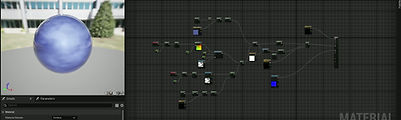
Animated orb material

Original Occlusion Method

Occlusion Material Function
Animated Materials
As a puzzle game, AJOL needed pieces, these pieces needed to easily readable from a distance. This led to their materials being animated based on (parameters) what was happening to them e.g. a light hit their input so the material shows light travelling though the object then emitting from the output.
The orb is one such material that is animated and changes colour when the level is completed. These animations are made to give the player clarity and a sense of satisfaction.
Source Control
In the process of making a game with a team, I became much more familiar with source control, in this case, Git.
I had used it on previous projects but not nearly as efficiently, as I worked on many aspects of the game in conjunction with the lead programmer on the game, improving co-ordination and comprehension of how to avoid conflicts.
We also used the practice of creating frequent branches to create many points to backup to if necessary.

Github Branches
Asset Optimisation

"Redirector" Puzzle Object Model
Having an isometric game in which the camera was distant from most objects presented an optimisation opportunity. All objects have the luxury of having less definition/vertices as they are smaller on the screen.
As a result, all of the models I created for the game(all of the puzzle objects) attempted to use the lowest amount of vertices possible without sacrificing fidelity. This gave me further perspective on how to optimise based on the type of game and the parameters of how every object will be seen.